Sprint 5 Individual Blog
Poll Feature Review Blog
Purpose of My Individual Feature
- Stores a person’s name and their interests (or any poll-related data)
- Supports full CRUD operations through API endpoints
-
Purpose of the group project is to connect people through shared interests and connect people in this way
Using postman to show raw API request and RESTful response (error code(s) and JSON)
Create:
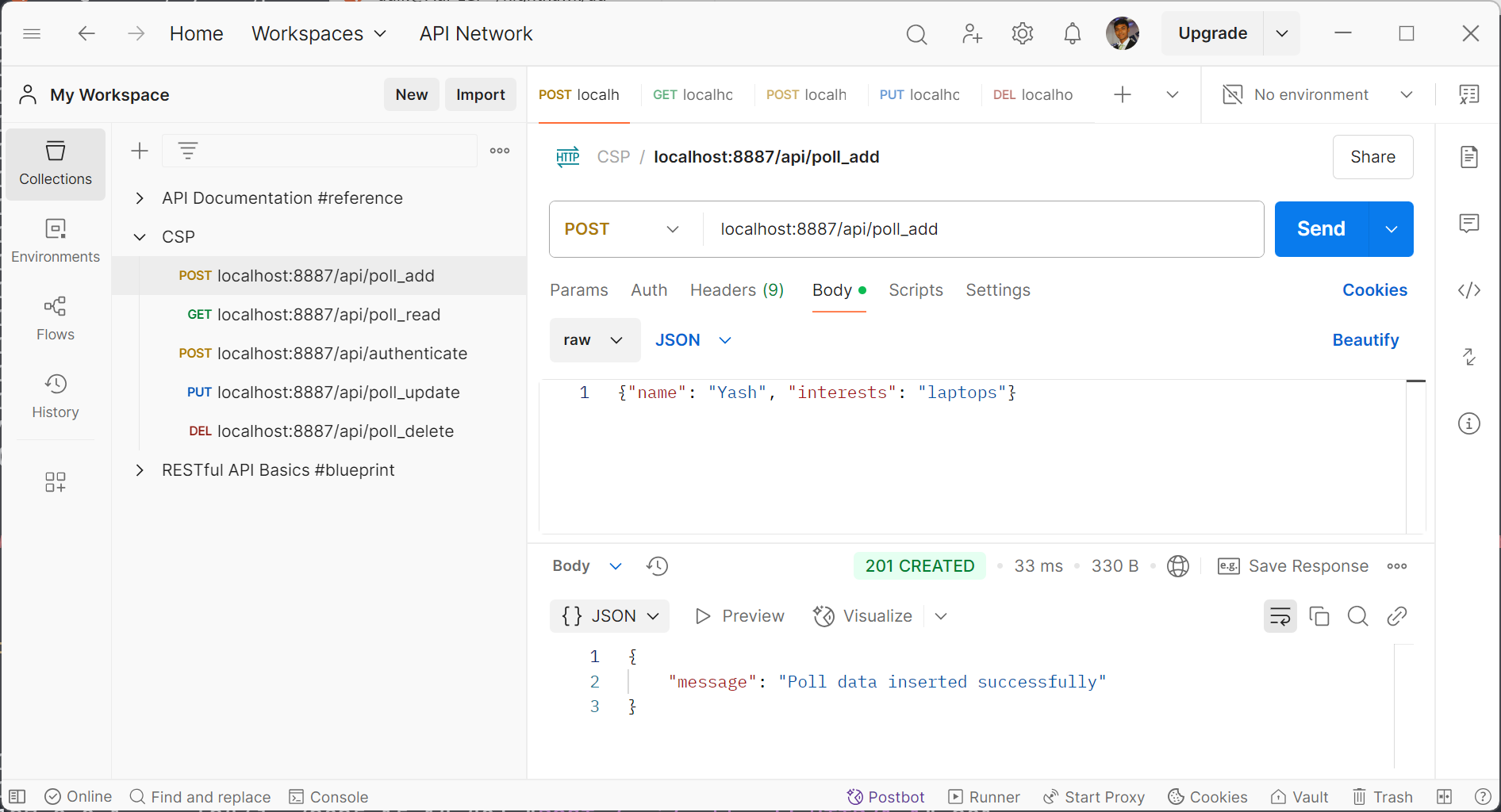 Read:
Read:
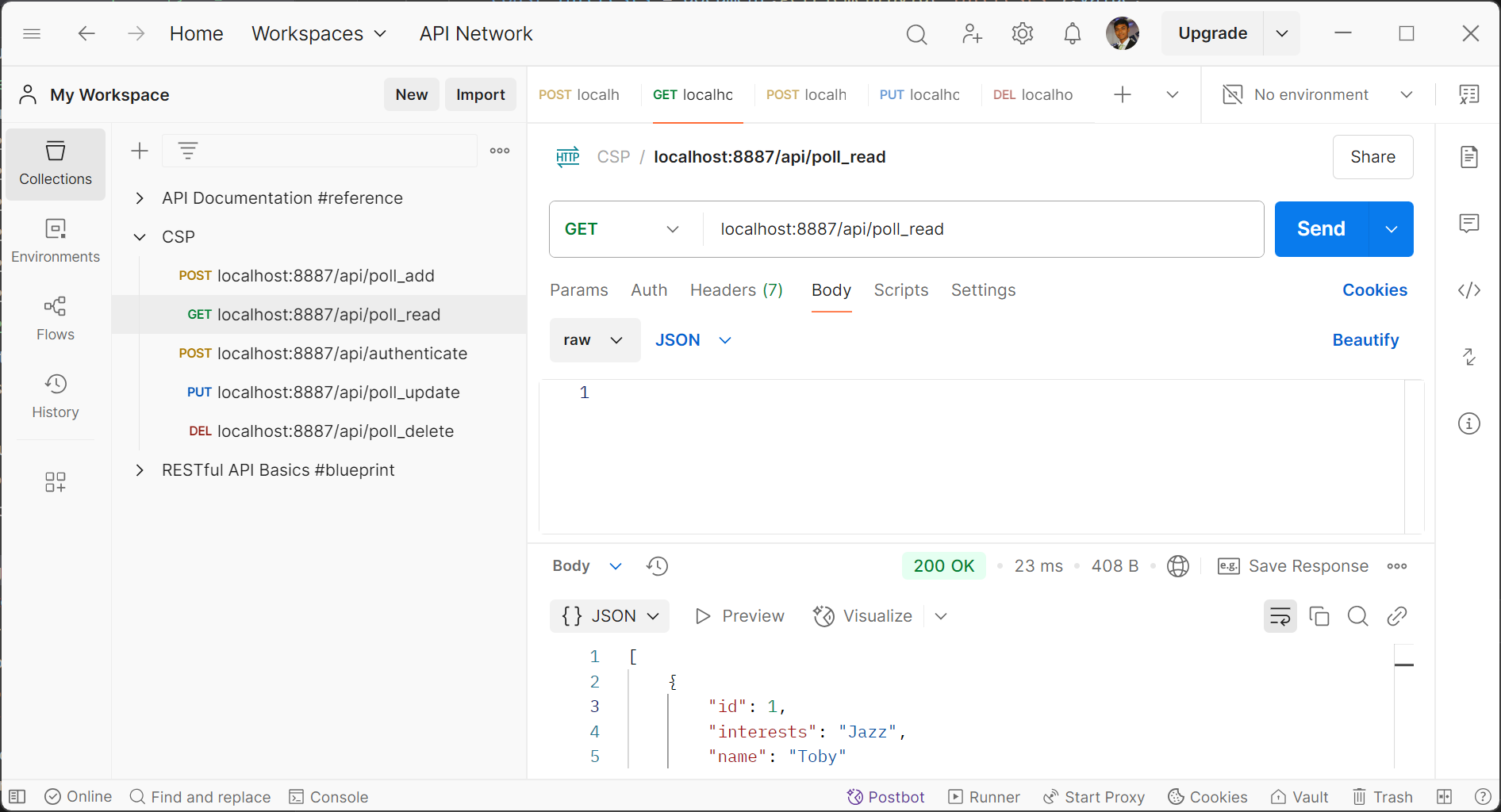 Update:
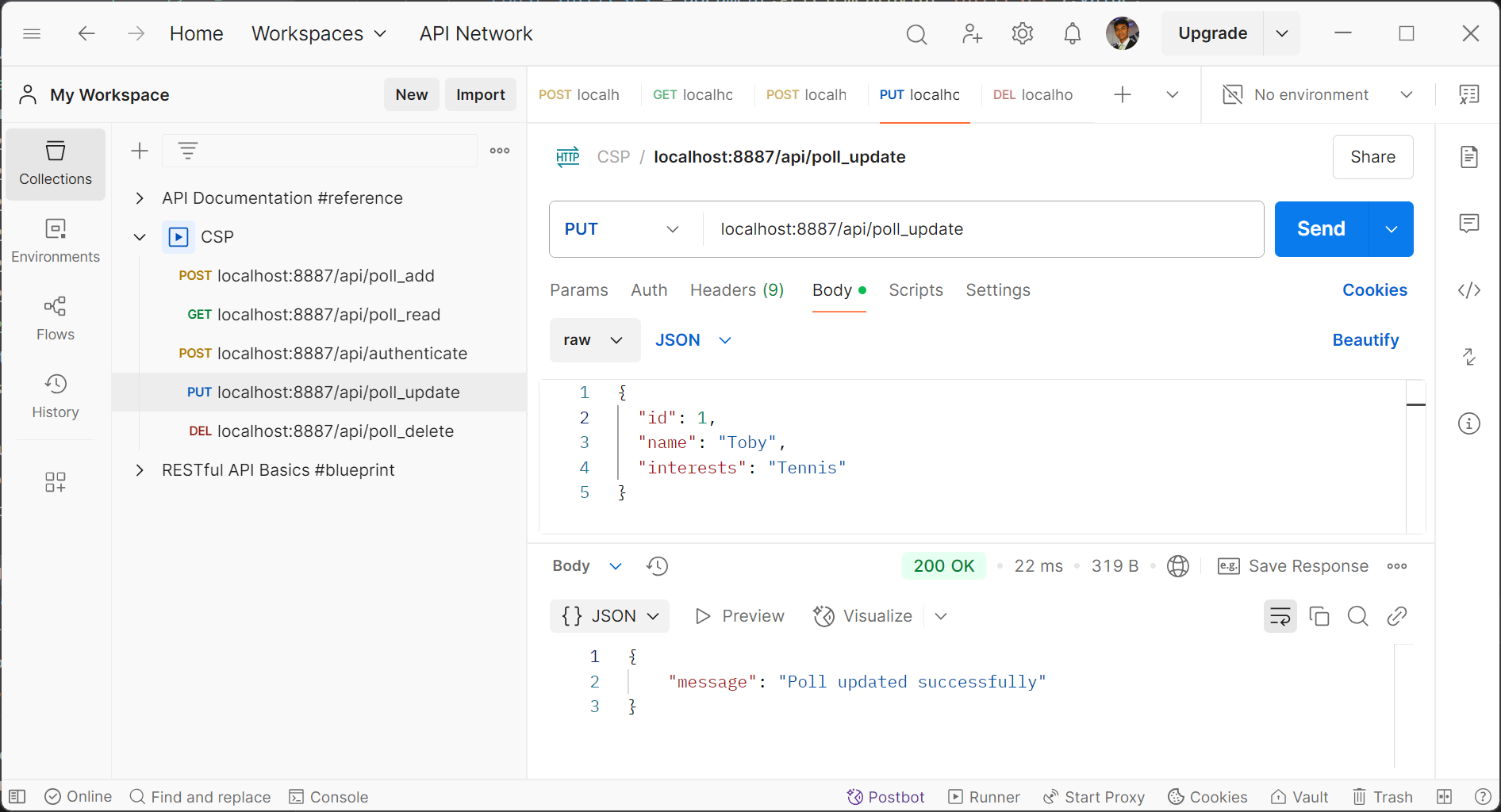 Delete:
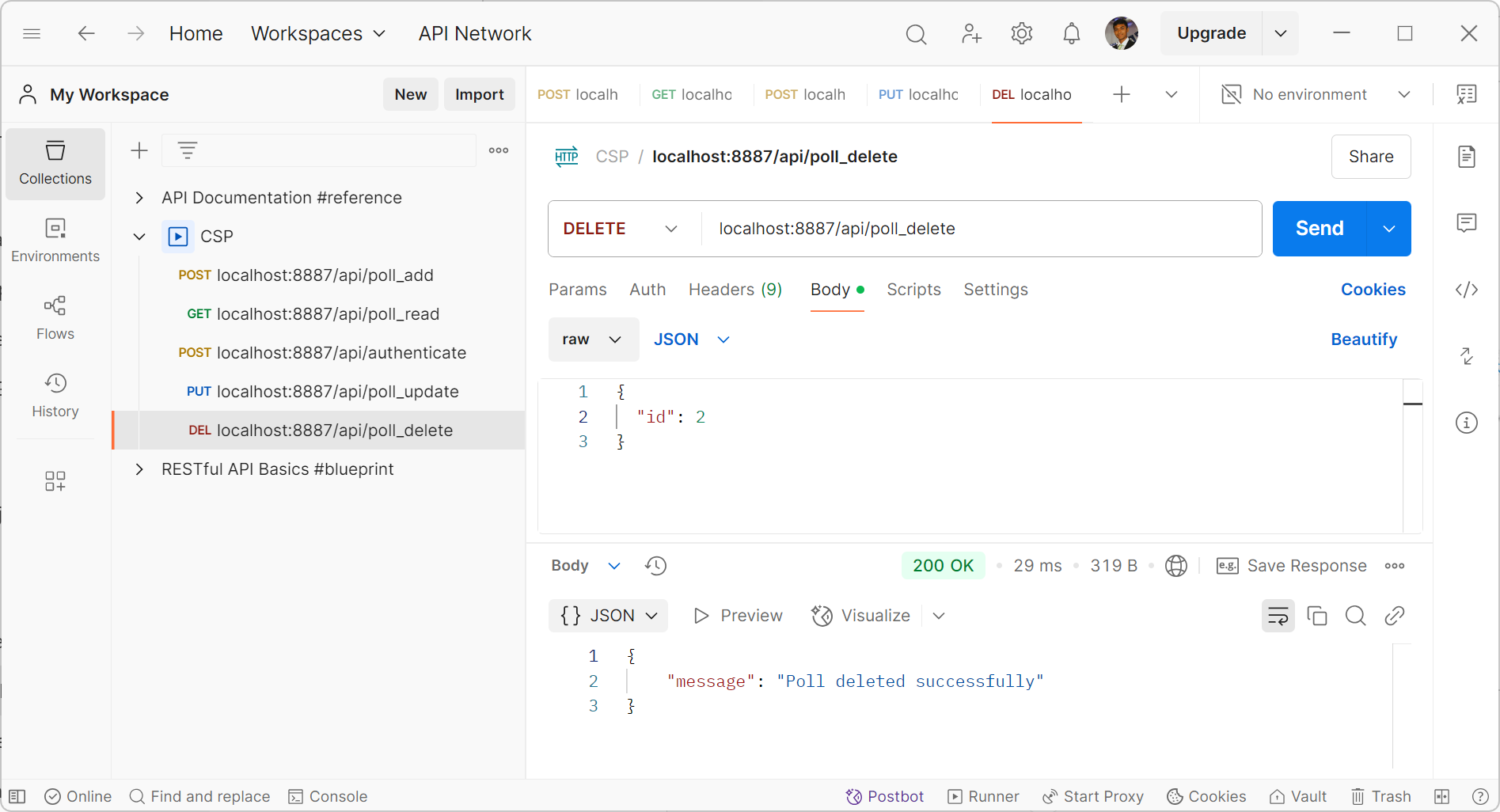
Using db_init, db_restore, db_backup to show tester data creation and data recovery.
Initialize Database
# model/poll.py

def initPolls():
    """
    Initialize the Poll table with default data.
    """
    polls = [
        Poll("Toby", "Jazz"),
        Poll("Niko", "Rock")
    ]
    for poll in polls:
        try:
            db.session.add(poll)
            db.session.commit()
            print(f"Added poll: {poll.name}")
        except Exception as e:
            db.session.rollback()
            print(f"Error adding poll: {poll.name} - {e}")
$ ./scripts/db_init.py
Warning, you are about to lose all data in the database!
Database backed up to instance/volumes/user_management_bak.db
All tables dropped.
Generating data.

...


Added poll: toby
Added poll: niko
Restore Database
# model/poll.py

@staticmethod
def restore(data):
    # Restore polls using a list of dictionaries.
    restored_polls = {}
    for poll_data in data:
        try:
            _ = poll_data.pop('id', None) # remove id column from poll_data
            name = poll_data.get("name", None)
            interests = poll_data.get("interests", None)

            poll_key = name
            poll = Poll.query.filter_by(name=name).first()
            if poll:
                poll.update(poll_data)
            else:
                poll = Poll(**poll_data)
                poll.create()

            restored_polls[poll_key] = poll
        except Exception as e:
            print(f"Error processing poll data: {poll_data} - {e}")
            continue

    return restored_polls
Backup Database
# main.py

def backup_database(db_uri, backup_uri):
    """Backup the current database."""
    if backup_uri:
        db_path = db_uri.replace('sqlite:///', 'instance/')
        backup_path = backup_uri.replace('sqlite:///', 'instance/')
        shutil.copyfile(db_path, backup_path)
        print(f"Database backed up to {backup_path}")
    else:
        print("Backup not supported for production database.")


def save_data_to_json(data, directory='backup'):
    if not os.path.exists(directory):
        os.makedirs(directory)
    for table, records in data.items():
        with open(os.path.join(directory, f'{table}.json'), 'w') as f:
            json.dump(records, f)
    print(f"Data backed up to {directory} directory.")

def backup_data():
    data = extract_data()
    save_data_to_json(data)
    backup_database(app.config['SQLALCHEMY_DATABASE_URI'], app.config['SQLALCHEMY_BACKUP_URI'])
Input/Output Requests
Formatting response data (JSON) from API into DOM:
<!-- navigation/worlds/polls.md -->

<table class="submit-answer-container">
    <thead>
        <tr>
            <th>Name</th>
            <th>Result</th>
        </tr>
    </thead>
    <tbody id="poll-data">
        <!-- Data will be dynamically inserted here -->
    </tbody>
</table>


<script type="module">
    import { pythonURI, fetchOptions } from "/adi_student//assets/js/api/config.js";

    try {
        var response = await fetch(`${pythonURI}/api/poll`, fetchOptions);
    }
    catch (error) {
        console.error('There has been a problem with your fetch operation:', error);
    }

    var data = await response.json();

    const pollData = document.getElementById('poll-data');
    pollData.innerHTML = '';

    data.forEach(item => {
        const row = document.createElement('tr');

        const nameCell = document.createElement('td');
        nameCell.textContent = item.name;

        const interestsCell = document.createElement('td');
        interestsCell.textContent = item.interests;

        row.appendChild(nameCell);
        row.appendChild(interestsCell);
        pollData.appendChild(row);
    });

</script>
Discuss queries from database where you extract a Python List (rows). Mention how these queries are provide by a 3rd. party library.
This code snippet uses SQLAlchemy, which makes it easier to use OOP to communicate with a database. It also uses methods in a class to work with columns in the database using CRUD operations.
class PollAPI:
    """
    Define the API endpoints for the Poll model.
    """

    class _Read(Resource): # R = Read
        """
        GET request handler: Read all polls.
        """
        @token_required()
        def get(self):
            try:
                # Retrieve all poll records
                polls = Poll.query.all()
                poll_list = []
                for poll in polls:
                    poll_list.append(poll.read())
                return jsonify(poll_list)
            except Exception as e:
                print(f"Poll Read Error: {e}")
                return {'message': f'Error retrieving poll data: {str(e)}'}, 500

    class _Create(Resource): # C = Create
        """
        POST request handler: Create a new poll.
        """
        @token_required()
        def post(self):
            try:
                data = request.get_json()
                if not data:
                    return {'message': 'No input data provided'}, 400

                name = data.get('name')
                interests = data.get('interests')

                # Basic validation
                if not name or interests is None:
                    return {'message': 'name and interests fields are required.'}, 422

                # Create and save the new Poll
                new_poll = Poll(name, interests)
                new_poll.create()

                return {'message': 'Poll data inserted successfully'}, 201

            except KeyError as e:
                return {'message': f'Missing field: {str(e)}'}, 400
            except Exception as e:
                print(f"Poll Create Error: {e}")
                return {'message': f'Error inserting poll data: {str(e)}'}, 500

    class _Update(Resource): # U = Update
        @token_required()
        def put(self):
            try:
                data = request.get_json()
                if not data:
                    return {'message': 'No input data provided'}, 400

                poll_id = data.get('id')
                if not poll_id:
                    return {'message': 'Poll ID is required.'}, 400

                poll = Poll.query.get(poll_id)
                if not poll:
                    return {'message': 'Poll not found.'}, 404

                name = data.get('name')
                interests = data.get('interests')

                if name:
                    poll.name = name
                else:
                    poll.name = poll.name

                if interests is not None:
                    poll.interests = interests
                else:
                    poll.interests = poll.interests

                poll.update({
                    "name": poll.name,
                    "interests": poll.interests
                })
                return {'message': 'Poll updated successfully'}, 200

            except KeyError as e:
                return {'message': f'Missing field: {str(e)}'}, 400
            except Exception as e:
                print(f"Poll Update Error: {e}")
                return {'message': f'Error updating poll: {str(e)}'}, 500

    class _Delete(Resource): # D = Delete
        @token_required()
        def delete(self):
            try:
                data = request.get_json()
                if not data:
                    return {'message': 'No input data provided'}, 400

                poll_id = data.get('id')
                if not poll_id:
                    return {'message': 'Poll ID is required.'}, 422

                poll = Poll.query.get(poll_id)
                if not poll:
                    return {'message': 'Poll not found.'}, 404

                poll.delete()
                return {'message': 'Poll deleted successfully'}, 200

            except KeyError as e:
                return {'message': f'Missing field: {str(e)}'}, 400
            except Exception as e:
                print(f"Poll Delete Error: {e}")
                return {'message': f'Error deleting poll: {str(e)}'}, 500

# Map the resources to their endpoints
api.add_resource(PollAPI._Read, '/poll')
api.add_resource(PollAPI._Create, '/poll')
api.add_resource(PollAPI._Update, '/poll')
api.add_resource(PollAPI._Delete, '/poll')
For the GET function:
Sequencing: retrieves poll data, creates empty list, iterates through poll data and appends to end of list, returns JSON output.
Selection: The try-except code block selects the error if an exception occurs and prints the error and returns output.
Iteration: Iteration through a for loop to add poll data into an empty array
For the PUT function:
JSON parameters are taken and converted into python list for usability and processing. The GET function returns a JSON response using jsonify which converts the list of poll data into JSON format.
Function to add a new poll
async function addPoll() {
    const name = document.getElementById('addPollName').value;
    const interests = document.getElementById('addPollInterests').value;
    const payload = { name, interests };

    try {
        const response = await fetch(`${pythonURI}/api/poll`, {
            ...fetchOptions,
            method: 'POST',
            headers: { 'Content-Type': 'application/json' },
            body: JSON.stringify(payload)
        });
        if (!response.ok) {
            throw new Error('Network response was not ok ' + response.statusText);
        }
        const data = await response.json();
        console.log('Poll added:', data);
        location.reload();
    } catch (error) {
        console.error('Error adding poll:', error);
    }
}
Function to update an existing poll
async function updatePoll() {
    const id = document.getElementById('updatePollId').value;
    const name = document.getElementById('updatePollName').value;
    const interests = document.getElementById('updatePollInterests').value;
    const payload = { id, name, interests };

    try {
        const response = await fetch(`${pythonURI}/api/poll`, {
            ...fetchOptions,
            method: 'PUT',
            headers: { 'Content-Type': 'application/json' },
            body: JSON.stringify(payload)
        });
        if (!response.ok) {
            throw new Error('Network response was not ok ' + response.statusText);
        }
        const data = await response.json();
        console.log('Poll updated:', data);
        location.reload();
    } catch (error) {
        console.error('Error updating poll:', error);
    }
}
Function to delete a poll
async function deletePoll() {
    const id = document.getElementById('deletePollId').value;
    const payload = { id };

    try {
        const response = await fetch(`${pythonURI}/api/poll`, {
            ...fetchOptions,
            method: 'DELETE',
            headers: { 'Content-Type': 'application/json' },
            body: JSON.stringify(payload)
        });
        if (!response.ok) {
            throw new Error('Network response was not ok ' + response.statusText);
        }
        const data = await response.json();
        console.log('Poll deleted:', data);
        location.reload();
    } catch (error) {
        console.error('Error deleting poll:', error);
    }
}
Function to fetch and display poll data
async function fetchPollData() {
    try {
        const response = await fetch(`${pythonURI}/api/poll`, fetchOptions);
        if (!response.ok) {
            throw new Error('Network response was not ok ' + response.statusText);
        }
        const data = await response.json();
        const pollData = document.getElementById('poll-data');
        pollData.innerHTML = '';

        data.forEach(item => {
            const row = document.createElement('tr');

            const nameCell = document.createElement('td');
            nameCell.textContent = item.name;

            const interestsCell = document.createElement('td');
            interestsCell.textContent = item.interests;

            row.appendChild(nameCell);
            row.appendChild(interestsCell);
            pollData.appendChild(row);
        });
    } catch (error) {
        console.error('Error fetching poll data:', error);
    }
}
Call the function and display the data on page load
document.addEventListener("DOMContentLoaded", function() {
    fetchPollData();
  });
Call/Request method with algorithm:
Frontend fetches from backend using PythonURI then takes then, depending on the method being used, either outputs it to DOM or uses the backend to add to database. During error conditions, the use of alert functions has been minimized to ensure a smooth UI when an exception occurs.
In conclusion, the Poll feature effectively demonstrates the integration of CRUD operations, database management, and frontend-backend communication to create a seamless user experience.